

ATS vs Excel: when a recruitment tracker spreadsheet stops being enough
Excel is a fine place to start. With dozens of candidates and several open positions, applications, deadlines and consents start to slip. Here is the comparison, step by step.
We help over 220 companies across every industry to hire more efficiently.





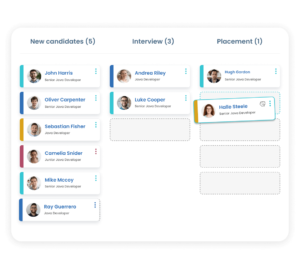
What is an ATS and how it differs from a spreadsheet
An ATS (applicant tracking system) is software for managing recruitment. Unlike an Excel recruitment tracker, you do not retype candidates into it. Applications from job ads and email load automatically, a resume becomes a profile, and all communication stays with the candidate. Excel is enough while you fill a few roles a year and one person does the hiring. As positions, colleagues and job boards add up, the spreadsheet starts to slow you down.
Where an Excel recruitment tracker falls short
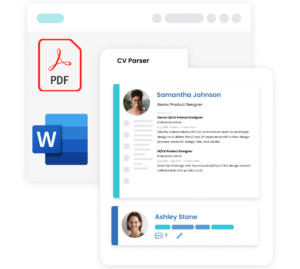
Resumes are retyped into the spreadsheet by hand
In an ATS the resume is processed automatically and the candidate profile is in the database right away. More about the resume parser
a resume processed in under a second
data sorted into categories
profiles matched to the right position automatically
Jobs are posted on each job board separately
From an ATS you publish a job to several job boards with one form and the applications load by themselves. More about job posting
28 direct job board integrations
more than 2,000 further job boards indirectly
applications in the database automatically

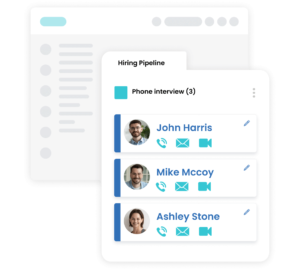
Communication lives in inboxes, not with the candidate
In RECRU the history of emails, messages and calls stays in the candidate profile, where the whole team can see it. More about candidate communication
email, SMS, WhatsApp and LinkedIn straight from RECRU
communication history in the candidate profile
bulk email and SMS
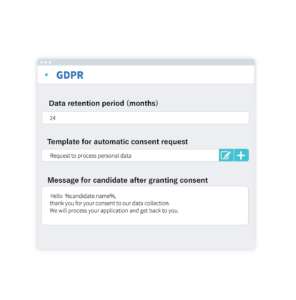
GDPR consent has to be tracked by hand
RECRU sends the consent request automatically and records the expiry date in the profile. More about GDPR in RECRU
automatic consent requests from your templates
consent and expiry in the candidate profile
a notification when consent expires
The report is rebuilt before every meeting
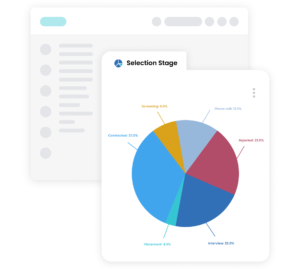
In an ATS, reports are generated automatically from the data your hiring already produces. More about reporting
charts and tables generated automatically
candidate sources and hiring costs
export to Excel when you need it
How to move from Excel to an ATS
Try it first, then roll it out
You can try RECRU free for 14 days. Rollout takes about 3 weeks in a small company and 1 to 3 months in a large one.
a 14-day free trial
rollout in about 3 weeks in a small company
every plan includes the full feature set
Excel or ATS: a recruitment comparison
The table shows what the same work looks like in Excel and in the RECRU ATS.
| Area | Excel and email | RECRU ATS |
|---|---|---|
| A new candidate | Resume data retyped by hand | A profile is created from the resume automatically |
| Job posting | A login and a form on every job board | One form for all selected job boards |
| Applications | In job board inboxes and email | Automatically in the database under the right position |
| Communication | In individual inboxes | History in the candidate profile, visible to the team |
| Searching the database | Spreadsheet filters and opening files | Boolean search, filters and the AI Agent |
| GDPR | Consents and dates tracked by hand | Automatic requests and expiry in the profile |
| Reports | Assembled by hand | Automatic reports and a dashboard |
Frequently asked questions about moving from Excel to an ATS
When is it worth moving from Excel to an ATS?
When you have several open positions at once, more than one person hires, or you post on several job boards. That is when applications, deadlines and consents start to get lost in a spreadsheet.
Is Excel enough for recruitment?
For a few roles a year and one recruiter, yes. But Excel cannot load applications from job boards, parse a resume or track GDPR consent.
What is an ATS?
An ATS is software that manages recruitment from the job ad to the hire. The glossary explains it in detail: What is an applicant tracking system.
How much does an ATS cost compared with Excel?
Excel costs nothing extra, but it costs time. RECRU starts at €19 per user per month on the FLEX plan, plus €0.10 per candidate profile per month. Prices exclude VAT. See pricing for details.
How long does it take to roll out an ATS?
About 3 weeks in a small company and 1 to 3 months in a large one.
Can I try RECRU first?
Yes. There is a 14-day free trial.
Where will candidate data be stored?
Data is stored in the EU. Access is protected by single sign-on (SSO), two-factor authentication (2FA) and an audit log.
Related glossary terms
What our customers love about RECRU
We are proud to be trusted by hundreds of companies from all over the world.
We have asked some of them what they appreciate about RECRU.

“My team can reduce administration time by up to 40% through automations.”

Gregor Weihs
CEO
at TalentShark

“We were impressed by RECRU’s great effort to adjust the tool to our needs”.

Alexandra Gombošová
Employee & Candidate Experience at VÚB

“We have found 4x more top candidates with the tool’s advanced search.”

Flóra Szabó
IT senior Project Manager at WHC

“Innovations and customer-centric approach is what I love the most about RECRU”

Filip Slabej
Director at DEKRA Development

“RECRU features help us maximize candidate and client experience.”

Asko Johanson
Senior Consultant at Tuocon

“LinkedIn plugin is one of the top features that convinced us to opt for RECRU.”

Marianna Szarková
HR & Marketing Manager at Techband
Start your 14-day free trial
Join hundreds of companies already hiring with RECRU.
Try RECRU in action
See how much faster hiring can be
No time to explore? Schedule a free demo with us